Tuesday, 31 March 2015

Evaluation Question 4: How did you use new media technologies in the construction and research, planning


Blogger was an absolutely vital tool used when creating and developing and preparing for the filming and construction of our music video. We used blogger to exhibition all of the research we had been doing in order to understand the different conventions of the music video and become aware of what types of things we would need to encompass within our own music video. This was effective as if I was not sure about something or we needed to structure the filming of our music video in a specific way then I could refer back to my blog and check and cultivate ideas of what we could add in there. Although blogger was not foreign to us based on the previous year, we learned to use more advanced features which helped us make our work more complex and dynamic for our teachers, audience and examiner.

YouTube was another software tool that was extremely important throughout the duration of creating our music video. This is because it allowed us to support our work with real life examples which supported our points and ideas. YouTube linked keenly with blogger and the two supported each other emphatically which helped us communicate our research and work more effective with our teachers and audience viewing our blog. YouTube was also the Website used to exhibition our final piece of work and our rough cut for our music videos which was important as from this our examiner and teachers can access our work.

Digital Camera


The digital camera was a crucial part in the development of our music video as it was what we used to film our music video. We also had to learn how to use the new music video cameras that we were using. At first I found it quite difficult figuring out how to use them in the most effective way which would help us film our music video in the best way possible. However, after practice, me and my group were able to figure out the functions of the camera and while out filming for our music video, we were able to use some slightly advanced functions which made the overall filming process more effective and fluent for us on set. An example of this is the function which allows you to preview what the film captured would look like with various different effects placed on it. The digital camera also links keenly to the mac where we were able to import the videos from the digital camera onto the video and then import them onto final cut express to complete the editing section of the process. Overall, the digital camera was mandatory and essential for our coursework and it was very rewarding learning and using them to the best of our ability.

Final Cut Express

Final Cut express - similar to that of the digital camera -was an essential piece of software needed for the process of developing our music video. This is based on the fact that it allowed us to edit the film captured on the digital camera for our music video. This meant that we could make our music video structured and allows the audience to follow the story within it. This means that using Final Cut Express was a challenge for our group but learning to use it properly was both challenging and rewarding. This is because it allowed us to explore the possibilities and experiment with the order and structure of the different shots we used for the music video. The way that music videos are edited are different to films which allowed us to establish the distinction between the editing techniques of the music video and the thriller film. The layer technique used for editing a music video is effective as it makes the editing process more simplistic then using any other style of editing and this meant that we could utilise final cut express to the best of our ability.

iPhone


We often used our iPhone's throughout the duration of constructing our media piece and especially for our advert and digipak. This meant that when capturing pictures for our digipak, instead of having to use big cameras and signing them out of media, we conveniently could use our phones which we have with us almost all the time which saved time in the sense that we knew exactly how to function the device while taking the pictures and importing them was also made easier and more straight forward then using the digital camera. 

Popplett


I learned how to use various different websites to exhibition my work on the blog. Popplet is an example of a website I used in the process of evaluating our work. At first I found it difficult to navigate around the website and also experienced some trouble uploading pictures onto the site. This was cleared up when I found a tutorial on YouTube which explained how to use the different tools and made me aware of the different features that Popplet had to offer. After this, I was able to use the website more smoothly and consequently present my work in more appealing and structured manner which would make it more stimulating for my audience while checking our or examining my work.

Prezi

Prezi is another website used throughout the process of creating and evaluating our music video. Prezi was slightly more easier to use for a beginner in comparison to Popplet. The style of Prezi was very attractive and the options for the different effects were appealing to a new user. This meant that I was able to create my work with a high value of presentation and appeal to audience. Prezi is a very effective website for explaining or telling a story as it adopts a chronologically type style to it where each different informative story follows on in order from the previous one. Overall I found Prezi really effective and alike Popplet it links keenly to Blogger where it can be embedded quickly and efficiently so all of my work is in the same place.

Slideshare


Slide share I found the most effective website in comparison to Prezi and Popplet. Although the websites are very different and they are all very effective and appealing in their different ways, I found slide share most effective as it allowed me to create a PowerPoint presentation much like that of Microsoft word which I know how to use and then I could share this online on my blog. I believe this to be extremely appealing and clever as people can communicate their work and their ideas simplistically and in a very presentable way which would make people inclined to use the website and create presentations for various different reasons. 


Monday, 30 March 2015

Evaluation Question 3: What have you learned from your audience feedback?


Evaluation Question 2:How effective is the combination of your main product and ancillary texts (DVD didgipak, Magazine advert)?

Evaluation Question 1In what ways does your media product use, develop or challenge forms and conventions of real media products?


Audience Feedback


Feedback

The feedback that we got from the rough cut of our music video was related to the editing pace and the different shots we used at different times throughout the videos.


Shot types

When we showed our teachers and three students from our class our rough cut of the video they gave some suggestions of improvements based on the shot types we used in the video. The master shot we used for the majority of video it was said was sometimes used for too long a duration at different times in the video. From this we incorporated a wider range of shots we took while filming this part of the music video which helped us give a flavouring to our video. This was based on the fact that we started to use different types of shots such as close up shots, medium shots and shots of the supporting members in the video. After incorporating these shots into our video, we asked the same audience to view it and they said that they were more stimulated and engaged by our work.


Narrative and Plot structure

The feedback also consisted on some suggestions on what we could do better to make our storyline within our music video make sense. This would make our music video more appealing to our audience as they would be able to understand our narrative and plot structure to a greater length than they would without this performance. Based on this, as a group we collectively decided that it would be a good idea to change the position of some of the clips throughout the editing of our video which would better structure our narrative and make our storyline clearer to our audience. After we made this improvement, the audience members who were viewing the video originally said that they could understand our story better and it made it easier for them to watch our media product and follow the structure of it.


Style and Finish

Originally, our video ended very abruptly which was quite shocking and unexpected for our audience. The audience members who watched our rough cut we skeptical of the quality of our ending and collectively as a group we decided that we needed to do something and use an effect to stylise the ending. Based on this, we used an unused clip that we had taken whilst filming our music video and instead of an abrupt ending with the song cutting out quickly and the screen turning to black, we added the clip in and allowed the music to fade out gradually instead of abruptly cutting off like it did originally and the screen slowing changing and turning black. This was a better ending to the music video as it was easier for the audience to digest and was less shocking. Overall, I believe that this new style of finish made our video more eloquently and related better to the tone and the pace of our video.


Finished advert


Finished Digipak


Finished Music Video


Constructing the Advert


This is the finished image of the advert on Photoshop. There were many different stages to the process of constructing our advert which consisted of using various different methods to make it look appealing and attractive to an audience who will view it as a potential consumer of our artist product.

Image


We aimed to link our advert keenly to our Digipak. Based on this, we decided to use the picture of the heads of the three band members lying down facing up towards the sky. We decided to use this for our advert cover as well as a picture for our digipak based on the fact that it includes all of the group members so people viewing it can easily acknowledge that our artist is a band. Also, the picture is rather abstract and different which we believe could be seen as a unique selling point for our artist. Overall, we agreed that this was the best picture to use for our advert cover and believe it is a strong and valid representation of our artists.


Lightening the image


We used the blending and colour tool in Photoshop to make the area around our heads a whiter shade as we believed the brighter colour compared to the darker and murkier greyish colour used in the image for our digipak would be more eye-catching and attractive for an audience looking at a magazine cover.

Name of Artist


There was debate about the position to put the title of our band on the advert cover. Originally we had thought to place it at the bottom of the advert cover but after some research and looking at real life examples such as an advert of the Arctic Monkey's album we decided that it would be better to locate the title of our band at the top of the advert cover.


The title of our band would be placed in a similar position to that seen above which is effective as it allows the audience to see the title of our band quickly and the impacting nature of the band being at the top of the screen means that consumers are appeased by the user friendly nature of our advert cover.

Font


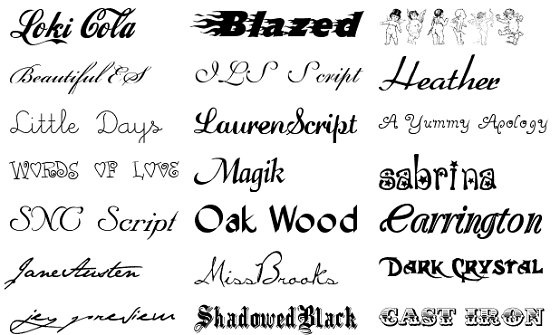
Originally we used the "Arial Black" font that was rather statutory and basic for our advert cover until we placed at the top of the advert cover and found that it was not attractive or stimulating to look at. We soon realised that we would need to bring a font that encompassed more spice and Jazz to make our advert appealing to a consumer and make them more inclined to purchase the product we have on service.


After deciding that the font that we used originally was too basic for our liking we decided to amp up the tempo a bit more and use a more interesting and dynamic font for our advert cover. The fonts seen above are some of the example fonts we used and experimented with before deciding to use the "Blackoak" font which was more advanced then the simplistic font we used at the beginning.

Ratings and Website


These are the elements of our magazine cover that make it look like a realistic piece of work. They are in the style of a real magazine advert based on the position they're are located on the cover. One line of feedback is at the bottom left hand side of the page and the other is at the bottom right hand side of the page. This position can be found on real life examples of magazine covers:


We believe that the names we created for our rating companies were strong. We used BCO and Tuneview which were both imaginary organisations who sound like they could be companies involved in the music industry. BCO is an acronym that sounds interesting and potentially could be an organisation involved in music. Tuneview is a Jazzy and authentic name that would evidently be involved in music so this is user friendly as they can relate the name to the music industry instantaneously.

QR Code
We deemed it essential to add in a QR code onto our magazine cover for the advert of our artist based on the fact that it is almost on every advert in real life in modern day. This makes our advert realistic and less likely for people to view our work and say no that is clearly not real. We experienced some problems when we were placing the QR code onto the advert based on the fact that it did not look attractive at first when we placed it on the left in ratio with the other features of our advert. After speculation we finally decided to place the QR code in the centre of our advert page as this would mean that it was better placed in relation to the other aspects and build up of our advert cover. 


Constructing the Digipak


This is the picture that our group finally decided on to use as the front of our digipak and album cover. After research we had established that a close up of the artist looking off to the side of the screen is a common and effective technique and image to use on the front of an album cover. 


We then moved the image onto Pic Monkey where we began to edit and experiment with the different tools, styles and options on the site to make the image look more realistic and exciting for an audience and consumer. 


At first we decided to give our digipak image a black and white feel. The airbrush tool was used to add a beard onto my face as we believed this was effective in relating our image to the vibe and edginess of our artist as they are essentially a Jazz band. 


After much speculation, we decided that the black and white style with a beard on the main artist in the group at the front did not work for us and we wished to change the dynamics of our digipak image. We began by using the fade tool to bring the tone of my face in the picture down and blend myself into the image so it is easier on the eyes of our audience once they view our media product and digipak. The burst effect allowed us to use a firework style effect in the background of the image with an appeasing golden glow colour to support which provides the element of spectacle to our work. 


We then established that the golden glow of our image was too over powering and we decided that we would scale down the spectacle factor and use a less outstanding and glowing colour and use a more woodland and nature based brown/maroon colouring style to have in our image. We believe this related to our artist as they are rather unique and authentic and we believe that the colour is very unique and specific.


We then decided to make the image more rough and urban which consisted of blending two colours again. The grey and the maroon blended together meant that the overall image looked less pretty and more bold and daring which is the image we developed we decided we wanted our artist to adopt. 


Music Video Rough Cut and Feedback


Editing the music video


The editing of our music video commenced on the 27th January 2015. We started by creating the different layers to our video which will allow us to alternate between the different shots so it makes it easy for us